What Is the SmartBear Zephyr Agent for Rovo? AI testing in Jira, explained
AI can now handle the slowest parts of test management, inside Jira. – The Zephyr Agent for Rovo creates test cases and links them to your work items, in the projects where your team already plans and builds. This guide covers how testing is changing in the AI age, what the agent is, where to find it, and how to run your first task.
Quick answer
The SmartBear Zephyr Agent for Rovo is an AI agent that works with your Zephyr test data through Rovo, Atlassian’s AI assistant in Jira. It generates test cases from requirements, checks coverage against work items, and summarizes release readiness. It’ is live today for Zephyr Standard and Advanced customers, at no additional cost. You open it through Rovo in Jira, with nothing to install.
Key Takeaways
- What it is: The Zephyr Agent for Rovo is an AI agent for test management that lives inside Jira. It’s live today for Zephyr Standard and Advanced customers, at no extra cost, with nothing to install.
- What it does: It generates test cases from your requirements, checks coverage, summarizes release readiness, and creates BDD tests, with more skills on the way.
- You stay in control, and it fits how you work: The agent proposes and you approve. Approved cases land as standard Zephyr data in your existing folders, labels, and reports, so your repository stays the single, auditable source of truth and nothing about your current setup changes.
- Getting started is quick: A first session takes minutes, generate from one requirement, reviews, and create in bulk.
Testing in the AI age puts pressure on QA confidence
Software delivery is accelerating, and AI is the accelerant. Teams ship faster, change more, and generate more code than their testing practices were built to absorb. This is the AI-disrupted SDLC in practice, and the pressure lands on QA as a confidence gap: knowing what was tested, what changed, and whether the application still behaves as intended, at a pace manual test creation can’t match. The same leaders feeling that gap carry a mandate to adopt AI across the delivery cycle. Closing both at once takes two things: a trusted record of what was tested, and AI applied to the testing work itself. The teams gaining the most from AI in quality run both in the same place, inside the system where the work already happens.
The foundation: A testing system of record in Jira
Zephyr is the Jira-native Testing System of Record. It connects test intent, execution, and outcomes with full traceability inside the Atlassian System of Work, where teams already plan, build, and ship. Requirements, test cases, executions, and results live together in one governed environment, so release decisions rest on measurable confidence, and the evidence survives across releases and teams. This is what application integrity looks like at the testing layer: intent, execution, and outcomes connected in one governed place, so quality is measurable rather than assumed.
That foundation decides how much AI is worth to a testing team. Placement determines what an agent can see and how usable its output is. An agent grounded in a governed repository proposes from real project context, and everything it creates lands where the work already lives, traceable to the requirement it came from. When you evaluate any AI testing tool, check two things: where the AI runs, and where its results land. Zephyr answers both with Jira.
The Zephyr Agent for Rovo: Support for QA practitioners, managers, & Jira admins in the testing tool chain
The Zephyr Agent for Rovo is the AI layer on that foundation of confident testing. Rovo is Atlassian’s AI assistant in Jira, and it hosts specialized agents from Atlassian and its partners. The Zephyr agent is the one built for testing. SmartBear built it, and it’ is grounded in your Zephyr test repository, so when you give it a testing task it works with your real project data, your requirements, your test cases, and your executions, and returns proposals you can act on without leaving the project. Your repository stays the single source of truth throughout. The agent reads from it and proposes changes to it, and you decide what gets saved.
Each role in the testing chain works with, and benefits from, the agent differently.
- For QA practitioners and manual testers, generation from requirements handles the most repetitive part of the cycle, which frees time for exploratory testing and the edge cases that need human judgment. The agent runs where they already work, so there’s no new tool to learn.
- QA managers get a team-level view: coverage keeps pace with scope, gaps show up before cycle planning, and release decisions draw on measurable data, rather than assumptions about what has, or hasn’t, been tested. For managers working under a mandate to adopt AI, the agent runs inside the system the team already owns.
- Jira admins work inside the environment they already govern. There is no separate surface to secure, no new user directory, and no additional tool to maintain.
- Across all three roles, the constant is the same: Zephyr stays the testing system of record, and AI works alongside it.
Where the agent lives in Jira
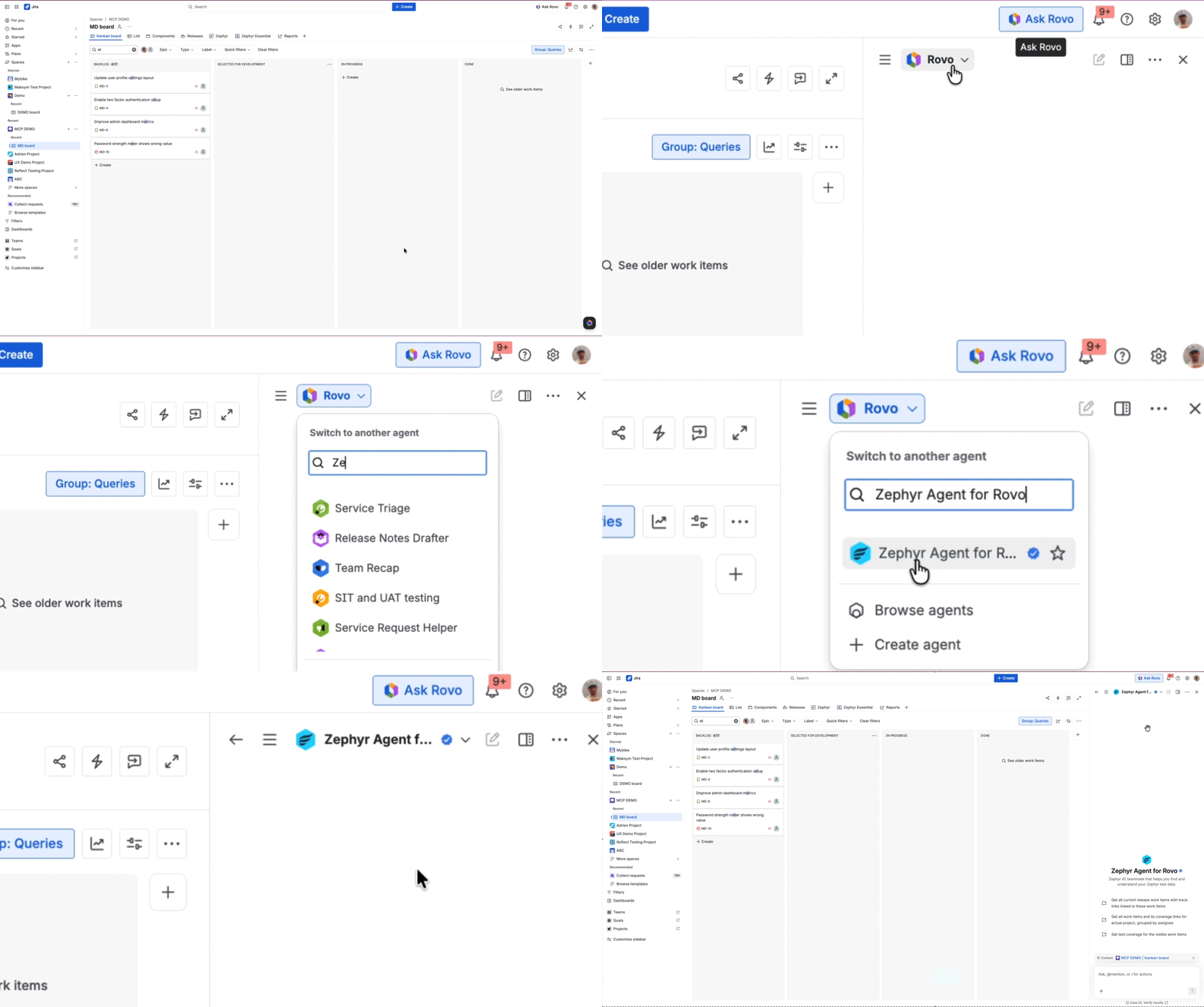
Open Rovo in Jira and select the Zephyr Agent for Rovo from your available agents. If your team runs Zephyr Standard or Advanced, the agent is already part of your stack, with nothing to install, no separate login, and no new tool for your admin to approve. If you don’t see it, make sure you’re on the latest version of Zephyr, since the Zephyr Agent for Rovo was introduced in Zephyr v6. The GIF below shows exactly where to look.
What the skills-enabled agent can do today
The agent works with your Zephyr test data through a set of skills. Some help create and organize tests, and others help you assess where a release stands. Here is what each one does.
- Test Case Generation is where most teams start. Point the agent at a work item with a requirement, or just describe the use case you want covered, and it drafts the test cases, covering the expected paths and the ones that are easy to miss, like what happens when a payment fails halfway through. You read the drafts, edit what needs editing, and add the ones you want to your project in one step. Test writing that used to take an afternoon takes minutes. If your team works in Gherkin, Create BDD Test Cases produces the same output in that format, ready to run. Test Coverage and Release Readiness support planning and release decisions. Test Coverage shows which work items in a release have no tests against them, so coverage gaps are visible while there’
is still time to close them. Release Readiness reads your test results and summarizes where the release stands, so a go or no-go discussion starts from the current data. The two connect in one flow: ask which work items are missing coverage, then ask the agent to generate tests for those gaps, and you have identified the risk and addressed it in the same conversation, inside your project.
- Fetch Test Case Details brings your existing test cases into the conversation. Ask about the test cases linked to a work item and the agent pulls their details directly into Rovo, so you can check whether your coverage holds up without leaving the chat to open each case in Zephyr. It’s the skill that lets the agent reason about what you already have, rather than just what to create next.
- Link Jira Work Item to Test Case keeps traceability current. It connects work items to their tests as you go, so the links stay accurate without manual updating, which keeps your reports and coverage views reliable as the volume of tests grows.
Watch the full flow, from coverage gap to execution-ready tests, in the demo below.
Your first task: Generate test cases from a requirement:
Pick one work item and run this flow. Any requirement your team is working on right now will do.
- Open the Zephyr Agent for Rovo and ask it to generate test cases for the work item, referencing it by key.
- Review what comes back. The agent proposes happy path and negative scenarios drawn from what the work item actually says.
- Adjust by prompting. Ask for more edge cases, a different structure, or BDD format, and the agent revises before anything is created.
- Create in bulk. Approve the set and the agent creates the test cases in your Zephyr project in one step.
- Check traceability. The new test cases link back to the work item, so coverage is visible from the requirement itself.
Plain prompts work best. Start with “Generate test cases for PROJ-142, include negative scenarios for the payment step,” then refine in the same conversation: “Add edge cases for expired cards and session timeouts.”
Your first working session takes minutes.
Governance and control
The agent keeps a person in control of everything that enters your test repository. It proposes, and you decide. Nothing is created automatically, so your team works at AI speed while your existing review standards stay in place.
Here is how that works in practice. Everything the agent produces arrives as a proposal you can read, edit, and reorder before anything is created. If a draft isn’t right, prompt a revision: ask for different preconditions, more negative scenarios, or a tighter scope, and the agent redrafts in place. Approval is explicit. You choose the cases to keep, the agent creates them in one action, and anything you leave out is discarded.
Approved work lands as standard Zephyr data. Test cases created by the agent land in your test case library, tagged with an “AI_generated” label so you can spot them easily. Trace links established through the agent work just like links created in the UI or through the API, so they show up in your reports, dashboards, and traceability views the same way. For teams in regulated environments, this means the evidence trail stays complete, because every addition passed through a person before it entered the record.
Try Zephyr Agent for Rovo on one work item today
Open Rovo in Jira, select the Zephyr Agent for Rovo, pick any work item your team is on right now, and ask for test cases. The review takes minutes, nothing enters your repository without your approval, and by the end of it you’ll have watched an afternoon of test writing happen inside one conversation.
Most teams begin with one project and one work item type, running generation on new requirements as they come in. A few things become measurable within weeks: the time from a requirement to reviewed test cases, the share of new work items with coverage, and how much writing time shifts to exploratory testing. From there, teams working in Gherkin add BDD generation, and managers fold the coverage and release readiness checks into cycle planning. Adoption follows the workflow the team already runs.
New to Zephyr? Start a free trial and the agent is part of your plan from day one.
Frequently asked questions
Which Zephyr plans include the Zephyr Agent for Rovo? Zephyr Standard and Advanced. The agent is part of both plans at no additional cost. Your team also needs Rovo enabled on your Atlassian instance, since the agent runs through it.
Is the agent available now? Yes, the agent and the skills described above are live in production. To get the newest skills, make sure your team is on the latest version of Zephyr, since older versions may not include all of them.
Does my Jira admin need to enable anything first? [
No. Your Jira admin should make sure the Zephyr app is updated to the latest version, which keeps the agent and its newest skills available to your team.
What data does the agent access? The agent works with the Zephyr and Jira project data your team already has access to. It uses the Zephyr APIs, which validate permissions on every call, so it reads and writes only what you already have rights to.
Does the agent work on Zephyr Data Center? Rovo runs on Atlassian Cloud, so the agent is available on Cloud. Teams planning a move to Cloud gain the agent as part of the capabilities waiting there.
How is this different from using a general AI chatbot to write test cases? A general chatbot drafts text from what you paste into it. The Zephyr Agent for Rovo is grounded in your repository and your work items, so its proposals reflect your actual project, and what you approve is created directly in Zephyr. It also needs no setup: the agent comes built into Zephyr and Rovo, purpose-built for how Zephyr’s data and workflows work, so there is nothing to configure before you start.
How long does it take to get started with Zephyr Agent for Rovo? It takes just minutes to get started. If your team is on Standard or Advanced on Cloud, open Rovo in Jira, select the agent, and run your first generation on one work item. There is no setup project or configuration to build first.
Will the agent replace testers? No. The agent removes the repetitive parts of test management. Your team keeps the judgment: what to test, what to approve, and when to ship.